
In today’s fast-paced digital world, data is the most valuable asset. Whether you are a student saving an assignment, a gamer loading a new title, a content creator editing a 4K video, or a professional storing an important file, reliable storage is no longer a luxury — it is a necessity. Internal drive space fills up quickly, and that is when an external hard drive becomes the smart solution.
But the question most people in Bangladesh ask is simple: “Should I buy an SSD, an HDD, or a portable drive?” Each option has its strength. An SSD delivers unmatched speed and durability, an HDD provides huge capacity at a lower price, and a portable drive combines convenience with flexibility for someone on the move. Choosing the right one can save money and improve performance in daily tasks.
At Tech Valley Bangladesh, we meet many customers facing the same confusion. That is why this guide is designed to give a clear answer, compare the latest SSD price in BD, HDD price in BD, and Portable drive in BD, and help you make the best choice for your need.
What is an External Hard Drive?
An external hard drive is a portable storage solution that connects to your computer or laptop through USB, USB-C, or Thunderbolt. Unlike an internal drive, it does not stay fixed inside your device — you can plug it in whenever you need, carry it anywhere, and use it across multiple devices. For anyone who works with large amounts of data, it acts like a digital backpack for files, movies, music, and games.
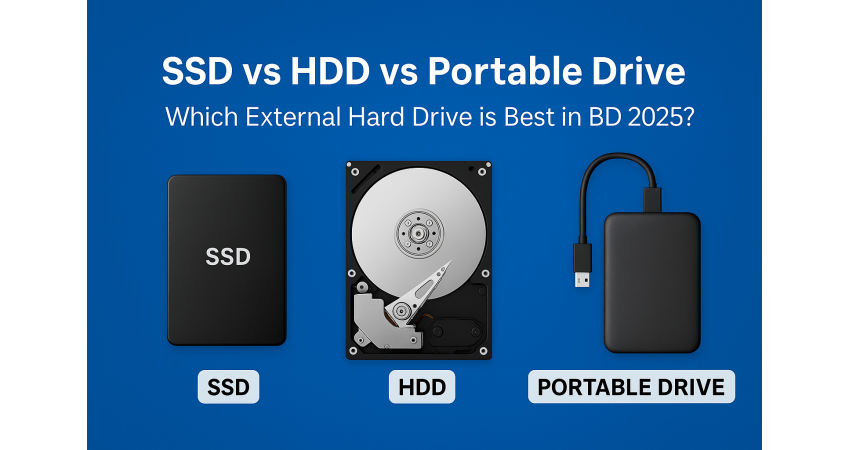
There are three main types of external hard drive you should know about:
- HDD (Hard Disk Drive): The traditional option that uses spinning disks to store data. It offers large storage capacity at a very affordable price, making it a popular choice for students and general users in Bangladesh.
- SSD (Solid State Drive): A modern storage drive with no moving parts. It is much faster, more durable, and consumes less power. An SSD is ideal for gamers, content creators, and professionals who need speed and reliability.
- Portable Drive: A compact and lightweight version of either an HDD or SSD. It is designed for easy mobility, so you can keep your important files with you at all times.
Common Uses of an External Hard Drive
- Data Backup: Securely storing photos, videos, and important documents to prevent data loss.
- Gaming: Running and installing games faster without slowing down your computer.
- Business & Office Work: Safely handling large project files, presentations, and client data.
- Quick Transfers: Moving data between laptops, desktops, or even sharing with colleagues on the go.
In short, an external hard drive is not just an accessory — it is an essential tool for anyone who values data security, speed, and convenience.
SSD vs HDD – Key Differences
Speed & Performance
- SSD (Solid State Drive):
An SSD is 5–10 times faster than a traditional HDD. Booting up your system, launching software, editing videos, or playing heavy games becomes much smoother with an SSD. - HDD (Hard Disk Drive):
An HDD is slower in read/write speed, but still reliable for storing bulk data such as movies, backups, and large project files.
Durability & Reliability
- SSD: With no moving parts, an SSD is shock-proof and less likely to fail due to drops or physical damage. It’s the best choice for people who carry their drives often.
- HDD: Since it uses spinning disks and read/write heads, an HDD is more fragile and prone to damage if dropped.
Price Factor (Based on Tech Valley, Bangladesh)
According to the official Tech Valley Distribution website:
- SSD price in BD (2025): starts at ৳1,350 and goes up to around ৳16,500, depending on brand, type (SATA or NVMe), and capacity.
- Portable SSD price in BD: starts at ৳9,500 for 1TB models, such as Apacer or SanDisk Extreme.
- HDD price in BD (2025): A well-known model like the Toshiba P300 2TB HDD is available at ৳7,550.
- Portable HDD price in BD: starts at ৳5,200 for 1TB drives.
All price data is sourced directly from Tech Valley Distribution
Verdict
- If you value speed and reliability, go for an SSD.
- If you want large storage at a budget price, an HDD is still the smarter choice.
- Many Tech Valley customers also prefer a hybrid setup — using an SSD for operating system and daily apps, while keeping an HDD for movies, backups, and bulk storage.
Portable SSD vs Portable HDD – Which One Should You Choose?
Portable SSD
A portable SSD is one of the best storage solutions if you want both speed and portability. It is very slim, lightweight, and fits easily in your pocket or bag. Unlike a traditional hard disk, it has no moving parts, which makes it more durable and resistant to shocks.
- Speed: A portable SSD can transfer files many times faster than a portable HDD. Moving a 10GB 4K video can take just seconds instead of minutes.
- Best Use: Ideal for photographers, video editors, gamers, and professionals who carry large projects or need to edit files directly from the drive.
- Price at Tech Valley:
- Starts from ৳9,500 for 1TB (Apacer Portable SSD).
- Goes up to around ৳21,500 for 2TB (SanDisk Extreme).
If your priority is fast performance and easy mobility, a portable SSD is the right choice.
Portable HDD
A portable HDD is the more budget-friendly option. It is a little bigger and slower because it uses spinning disks, but it provides much more storage space at a lower cost.
- Storage Capacity: Available in 1TB, 2TB, and even larger sizes, making it perfect if you need to store lots of movies, backups, or documents.
- Best Use: Great for students who need large storage at low cost, office workers who need to back up data, or anyone who keeps big media collections.
- Price at Tech Valley:
- Around ৳4,200–4,800 for 1TB models.
- About ৳6,800–7,500 for 2TB models.
If your priority is higher storage at the lowest cost, a portable HDD is the smart option.
Pen Drive
A pen drive (USB flash drive) is one of the most common and handy external storage devices. It is small, lightweight, and plug-and-play, which means you can instantly connect it to a laptop, desktop, or even a smartphone (with OTG support). Pen drives are perfect for quick file transfers such as documents, music, photos, or even short video clips. Many students, office workers, and professionals in Bangladesh use them daily because of their portability and low price.
At Tech Valley, pen drives are available in different capacities and speeds.
- Pen drive price in BD (Tech Valley): ranges from ৳435 up to ৳2,850.
A pen drive is the best option for carrying small files in your pocket or keychain. However, if you need to store large projects, games, or movie collections, an external SSD or HDD will still be a better long-term choice.
Final Verdict
Both portable SSD and portable HDD have their advantages:
- Go for a Portable SSD if you want speed, durability, and portability — especially useful for professionals and creators.
- Go for a Portable HDD if you need big storage on a budget — especially for backups, students, or storing movies.
- Choose a Pen Drive if you want the fastest grab-and-go storage for documents, music, or photos — a pocket-sized tool that’s always ready when you are.
Some people even combine the two: they use a portable SSD for daily active projects and a portable HDD for long-term storage.
How to Choose the Right External Drive in Bangladesh
Buying an external drive is not just about picking any SSD or HDD — the right choice depends on your usage, budget, and future needs. Here are the main points you should consider before making a purchase in Bangladesh:
1. Storage Capacity
- For Students: If you mostly handle class notes, assignments, or small projects, a 256GB–512GB SSD is enough. If you also store movies or games, a 1TB HDD is more budget-friendly.
- For Professionals: Content creators, designers, and office users often need more speed and space. A 1TB–2TB SSD is the best balance between performance and capacity.
- For Businesses: Companies dealing with huge amounts of data, CCTV footage, or shared projects should go for 2TB+ HDD or even a NAS system for team access.
Tip: Always choose a little higher capacity than your current need — files grow over time.
2. Budget Considerations
- HDD: The cheapest way to get big storage. Ideal if you want 1TB or more without spending much.
- SSD: Costs more but delivers faster speed, longer life, and better durability. Best if performance matters.
- Portable Drives: Portable SSD is expensive but extremely fast; portable HDD is more affordable but slower.
Tip: If your budget allows, combine both: SSD for speed, HDD for bulk storage.
3.Interface & Connectivity
The port you choose decides how fast your drive works:
- USB 3.2 or USB 3.1: Standard and widely supported, good speed.
- USB-C: Faster and future-ready, works on modern laptops.
- Thunderbolt: Very fast, but only available on high-end devices.
Tip: Always check your laptop/PC port before buying, otherwise you won’t get the speed you expect.
4. Brand & After-Sales Support in Bangladesh
Storage devices are sensitive — warranty and support matter a lot. Reliable global brands like WD, Seagate, Samsung, Transcend, and SanDisk dominate the Bangladeshi market.
At Tech Valley, you get:
- Official brand warranty (1–5 years depending on the model).
- Genuine products directly from authorized distribution.
- Local after-sales service and replacement support.
Tip: Never buy unbranded or non-warranty drives, as a single failure could mean total data loss.
Final Advice
When choosing an external drive in BD:
- If you want speed → SSD
- If you want affordable bulk storage → HDD
- If you want portability with performance → Portable SSD
- If you want budget portability → Portable HDD
- If you just need something quick and small → Pen Drive
At the end of the day, pick the one that matches your daily lifestyle, not just your budget.
Tech Valley’s Top Recommendations (2025 Bangladesh Market)
|
Device Type |
Brand/Model |
Capacity |
Price in BD |
Key Features |
|
SSD |
256GB |
~BDT 2,250 |
High-speed, reliable |
|
|
SSD |
128GB |
~BDT 1,700৳ |
Professional use |
|
|
HDD |
1TB |
~BDT 5,850 |
Affordable, large storage |
|
|
Portable SSD |
1TB |
~BDT 13,000 |
Shock-proof, fast |
|
|
Portable HDD |
2TB |
~BDT 6,250 |
Budget-friendly |
|
|
Pen Drive |
64GB |
~BDT 750 |
Everyday use |
Use-Case Based Suggestions
Choosing between SSD, HDD, or portable drives often depends on how you plan to use it. Here are some practical recommendations for Bangladeshi users:
Gamers
- Best Choice: SSD or Portable SSD
- Why: Games today come in 50GB–150GB sizes and demand high loading speed. An SSD makes loading screens almost vanish and improves overall gameplay smoothness.
- Extra Tip: Use an SSD for installing your main games and a separate HDD for storing less-played titles.
Students
- Best Choice: Portable HDD
- Why: Students usually need a budget-friendly option with enough space for assignments, e-books, class recordings, movies, and some games. Portable HDDs give 1TB–2TB storage at a low price.
- Extra Tip: Always back up critical study projects on Google Drive or OneDrive in case your HDD gets damaged.
Content Creators (Video Editors, Photographers, Designers)
- Best Choice: Portable SSD
- Why: Handling 4K/8K video files, RAW photos, and large project files requires high-speed storage. A portable SSD lets you edit directly from the drive without lag.
- Extra Tip: Keep an external HDD as backup storage to avoid filling up your SSD too quickly.
Office Users & Professionals
- Best Choice: A combination of HDD + SSD
- Why: Offices need reliable backups for documents, spreadsheets, and databases, which HDDs provide cheaply. At the same time, professionals benefit from SSDs for fast access to daily files and software.
- Extra Tip: Businesses or teams should consider a NAS drive for shared access across multiple employees.
Everyday Casual Users
- Best Choice: Pen Drive
- Why: If your needs are simple—transferring music, photos, or presentations between devices—a pen drive is the easiest and most affordable choice.
- Extra Tip: Go for a USB 3.0 or USB 3.2 pen drive from Tech Valley for faster transfer speeds than older USB 2.0 models.
FAQ Section
- Which is better for daily use — SSD or HDD?
SSD for speed, HDD for cheap large storage.
- Is a portable SSD worth it over a portable HDD?
Yes, if you need speed; HDD if you need more space for less cost.
- Which drive is best for gamers?
SSD or Portable SSD for faster game loading.
- What is the cheapest option for students?
Portable HDD, because it offers more storage at a low price.
- How do I choose between SSD, HDD, and Portable Drive?
SSD = speed, HDD = budget storage, Portable = easy to carry.
Get the Right External Drive Solution with Tech Valley Bangladesh
Finding the perfect external drive is all about matching your needs with the right technology. At Tech Valley Bangladesh, we provide he latest storage solutions with official warranty, reliable after-sales support, and best price in BD. Whether you’re searching for the Fastest SSD, a High-capacity HDD, a performance-driven Portable SSD, a Budget-friendly Portable HDD, or a pocket-sized Pen Drive, Tech Valley has the ideal option for you. Buy smart, buy genuine — and get complete peace of mind with Tech Valley.

There are no comments for this Article.