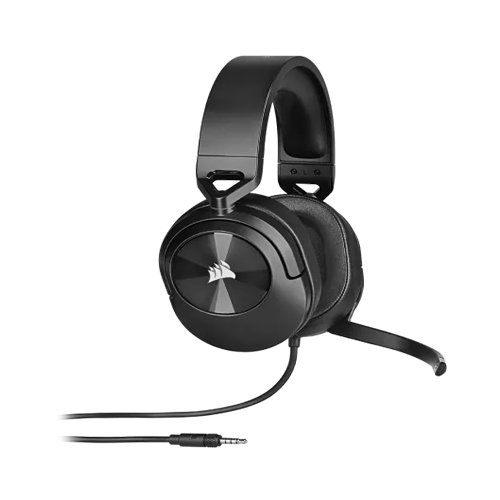
Corsair HS55 Stereo 3.5mm Gaming Headphone – Clear Sound for Gamers
The Corsair HS55 Stereo 3.5mm Gaming Headphone is designed for gamers who want high-quality audio, comfort, and versatility at an affordable price. Whether you’re engaging in competitive esports, streaming your favorite games, attending online classes, or enjoying music, the HS55 delivers clear stereo sound and reliable voice communication. Its lightweight and ergonomic design ensures comfortable long gaming sessions, making it a perfect companion for both casual and dedicated gamers in Bangladesh. Equipped with a high-quality noise-canceling microphone, the HS55 reduces background noise for crystal-clear voice transmission during multiplayer games, team chats, or online meetings. The 3.5mm stereo connection provides broad compatibility with PCs, laptops, consoles, and even mobile devices, giving gamers in Bangladesh a versatile audio solution without the need for additional adapters or drivers.
The stereo audio drivers provide balanced sound with clear mids and highs, making in-game effects, dialogue, and music more immersive. Unlike bulky gaming headsets, the HS55 is lightweight yet durable, featuring soft memory foam ear cushions and an adjustable headband for maximum comfort during long play sessions. Whether you’re studying, working, or gaming, this headset ensures every sound is heard accurately, enhancing your overall experience. For gamers and students in Bangladesh looking for a cost-effective, reliable, and easy-to-use gaming headset, the Corsair HS55 delivers a perfect balance of performance, comfort, and affordability. It combines trusted Corsair quality with user-friendly features, making it ideal for online classes, office calls, and long gaming sessions alike.
Corsair HS55 Stereo 3.5mm Gaming Headphone – User Manual
Package includes a Corsair HS55 Stereo 3.5mm Gaming Headphone and a User Manual / Quick Start Guide. Simply follow these setup instructions-
-
Connect the Headphone: Plug the 3.5mm headphone jack into the audio output port of your device. Plug the microphone jack into the mic input port if your device has separate ports. For devices with a single 3.5mm combo port, use a compatible splitter adapter (sold separately).
-
Adjust the Fit: Expand or retract the headband to fit your head comfortably. Position ear cushions over your ears and adjust the mic near your mouth.
-
Test Audio & Mic: Play audio on your device to ensure sound is clear and balanced. Speak into the microphone and check if your voice is detected clearly.
- Usage Tips: Keep the headphone clean by wiping ear cushions with a dry cloth. Avoid pulling or twisting the cable to maintain durability. Store in a safe place when not in use to prevent damage. Use with moderate volume to protect your hearing.
Get the Best Price of Corsair HS55 at Tech Valley
Tech Valley Distribution is your trusted tech partner in Bangladesh, offering 100% genuine products with official warranty, competitive prices, and fast nationwide delivery. Enjoy reliable local support and hassle-free shopping from a brand that thousands of customers already trust. Get your desired products at the best price from our huge stock of Corsair Headphone, Logitech Headphone and all branded Headphones.




 Save
Save
 Add to Compare